
From Zero to Deployed: Site Security
🧵 How I Wrestled CSP into Submission
If you’ve ever stared at your browser console, muttering, “What on earth is blocked:csp?” — welcome to the club. Here is how I managed to deploy security to my functioning domain: prevalis.ai.
Zero-to-Deployed Saga:
If you haven’t read my Zero-to-Deployed Part 1, see it here.
✨ What is CSP?
Well it’s Content Security Policy, delivered via a HTTP response header that defines approved sources of content that the browser may load. It can be an effective countermeasure to Cross Site Scripting (XSS) attacks, is also widely supported and usually easy to deploy.
🚧 The Chaos Begins
With my website up and running smoothly, I wanted to beef up security further. Plus, I stared testing my webapp, with flask + python+ mysql integration.
Since my site is hosted on cloudflare, I added /public/_header file as per instruction on Cloudflare Docs
Well, it started innocently enough, so far. Then I tried adding some javascripts, Google search bar integration, markdown support, etc. Then came the swarm:
blocked:csp on scripts from th.js Broken styling from fonts.googleapis.com Images like branding.png mysteriously rejected Even Chrome’s innocent generate_204 ping got the axe
Every time I thought I patched one directive, another alert popped up like whack-a-mole in the browser console.
🔍 Hunting Down the Culprits
I combed through initiators, traced scripts to their source domains, cracked open DevTools. I learned the hard way that Google’s Custom Search Engine (CSE) has an entourage: scripts, styles, images, invisible connectivity checks — all with strict domain needs.
🛠️ Tweaks, Tests, Triumphs
Through trial, error, and late-night sessions, I sculpted the final CSP:
🎯 Specific domain whitelisting, not wildcards
🔐 Removing unsafe-eval where possible
🧠 Mapping each Google component to its proper directive
🚀 Finally watching the search bar load without any console complaints
You can peek at the finished CSP header — it’s a balance of strict security with seamless functionality.
# Content Security Policy
response.headers['Content-Security-Policy'] = (
    "default-src 'self'; "
    "script-src 'self' 'unsafe-inline' https: http: https://unpkg.com https://cdn.jsdelivr.net https://static.cloudflareinsights.com; "
    "style-src 'self' 'unsafe-inline' https://unpkg.com https://cdn.jsdelivr.net https://www.google.com https://clients1.google.com https://fonts.googleapis.com; "
    "font-src 'self' https://fonts.gstatic.com "
    "img-src 'self' https://www.google.com https://www.gstatic.com data: https://clients1.google.com; "
    "frame-src https://*.google.com; "
    "connect-src 'self' https://cdn.jsdelivr.net https://unpkg.com https://clients1.google.com https://www.google.com https://www.googleapis.com
    https://cse.google.com https://www.gstatic.com; "
    "object-src 'none'; "
    "base-uri 'self'; "
    "form-action 'self'; "
    "frame-ancestors 'self'; "
    "media-src 'self'; "
    "manifest-src 'self'; "
    "worker-src 'self'"
    )
✨ What I Learned
CSP is as much art as science.
“Blocked:csp” is never random — it’s an invitation to learn.
And sometimes, perfection means iterating until nothing breaks — then double-checking just in case.
📝 Final Thoughts
If you’re staring down the barrel of CSP errors on your own project, just know: it’s beatable. Document every source, test in report-only mode.
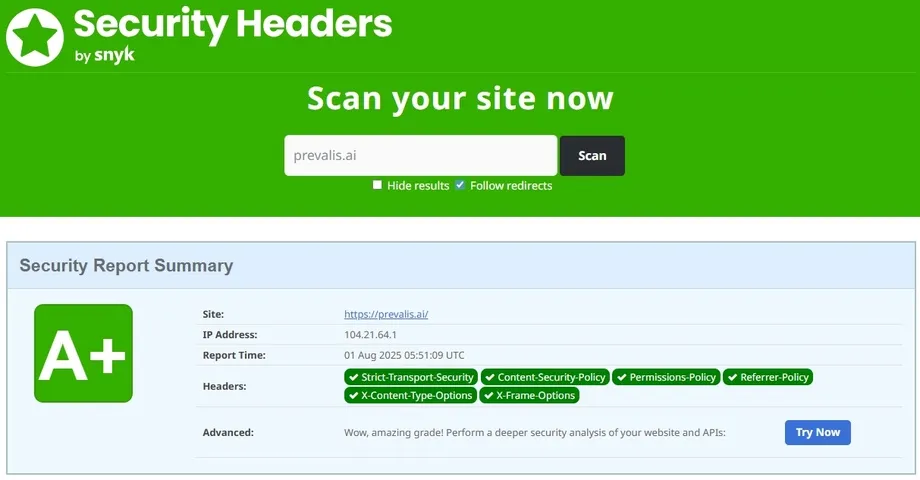
For more info on Content Security Policy, checkout scotthelme.co.uk blog. To test your website Security Header, I use Security Header. Below is the result of a scan on my site.
📬 What’s Next
- I still have a lot more to learn, so stay-tuned!
🔗 Connect
I’m building Prevalis Strategies as a technical + strategic consulting venture. Follow the journey, learn with me, or drop suggestions or questions!
Domain: https://prevalis.ai
Email: [info@prevalis.ai]
Built & maintained by: prevalis.ai ✨